Managing Legacy Infrastructure Through Natural Language: IIS and Agentic AI

calendar icon 25 January 2026
clock icon 7 minutes read
Managing Legacy Infrastructure Through Natural Language
Share article

Most of our projects have adopted containerization and cloud technologies. But in  reality, many legacy systems still run on bare-metal infrastructure. Sometimes because of strict security requirements, specific dependencies, or simply the cost and risk of migration.

Now, we're talking about IIS (Internet Information Services) - Microsoft's web server that is still widely used in corporate environments. The problem is that managing such systems often requires direct server access, which creates a barrier for developers and increases operational complexity.

The Problem: Balancing Security and Convenience

Traditional approaches to managing legacy infrastructure have significant drawbacks:

  • Scripts and CLI: Require exact knowledge of resource names, command syntax, and often direct server access

  • Management panels: Force developers to leave their familiar development environment (IDE) and switch to a web interface, while also introducing additional operational complexities and creating another attack vector

  • Remote script execution: Creates security risks and requires complex policy configuration, and more often than not, is simply not allowed by security policies

We need a solution that:

  • Doesn't require direct server access

  • Allows working from a familiar development environment

  • Is intuitively understandable to any developer

  • Compensates for inaccuracies in requests

The Solution: MCP and Agentic AI

Model Context Protocol (MCP) is an open protocol that allows AI agents to interact with external systems through a standardized interface. Combined with Agentic AI (AI agents capable of independently planning and executing tasks), we get the ability to communicate with infrastructure in natural language.

The idea is simple: what could be more intuitive and understandable to a human than their own language of communication? Instead of writing scripts or using web interfaces, a developer simply tells their AI assistant: "Stop the production-api site" or "Show me all running sites on the server." The AI understands the intent, finds the right server and resources, and executes the operation.

Solution Architecture

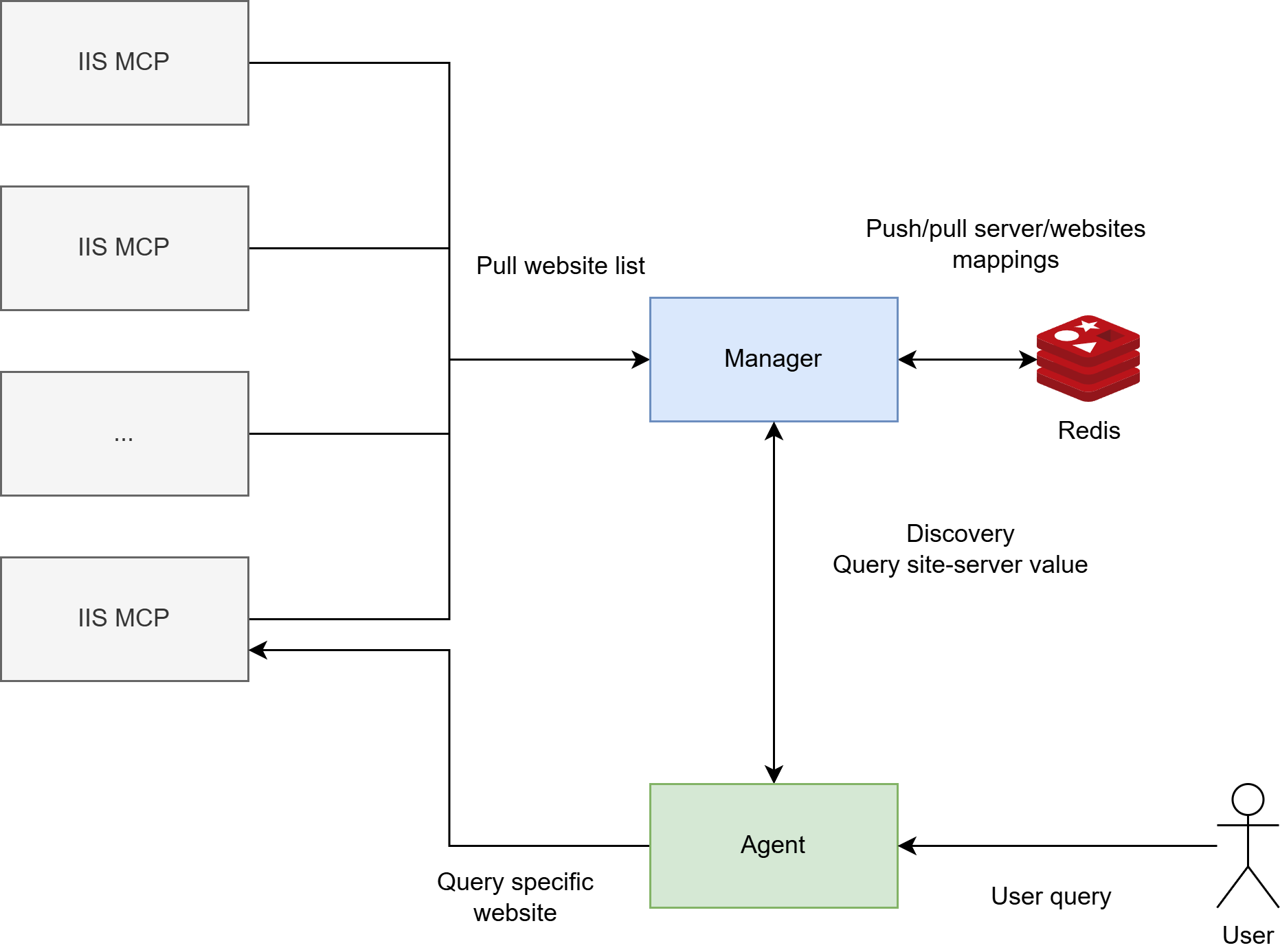
The solution consists of four components:

1. IIS MCP Server

A server that runs on each Windows machine with IIS. It provides an MCP interface for managing local IIS resources:

  • Websites: list, get information, start, stop, restart, create, delete

  • Application Pools: full lifecycle management of application pools

  • Machine information: hostname, external IP address

All commands run locally on the server, eliminating the need for remote script execution. Communication happens via HTTP/HTTPS with API key or OAuth authentication.

2. IIS MCP Manager

A central coordinator that maintains a registry of all websites and their servers. The manager:

  • Periodically polls registered IIS MCP servers

  • Discovers websites and application pools on each server

  • Stores the "site - server" mapping in Redis

  • Provides an MCP interface for agents to find which server hosts a specific site

This solves the scaling problem: when you have dozens of servers and hundreds of sites, the AI agent first asks the manager "where is site X?", receives the address of the needed server, and then directly contacts the corresponding IIS MCP Server. This significantly reduces the number of requests to target servers, directly impacting many factors, from response speed and achieving the target result to simply reducing network load.

3. Redis Storage

A centralized storage for metadata:

  • Site-to-server mapping

  • Server information (URL, connection status)

  • Machine metadata

  • Timestamps of last updates

4. AI Agent

The AI agent is the interface between the developer and the infrastructure. It connects to the client (chatbot, IDE) and processes requests.

Key agent functions:

  • Request interpretation: Understands user intentions even when the user hasn't provided all necessary information

  • Resource discovery: Finds needed sites and application pools by partial names, keywords, or descriptions through the Manager

  • Operation coordination: Plans and executes multi-step operations, such as searching for a resource across multiple servers followed by performing an action

  • Action execution: Starts, stops, restarts sites and application pools on the appropriate servers

  • Error handling: Understands errors from servers and suggests solutions or asks clarifying questions

The agent connects to IIS MCP Manager via the MCP protocol for resource discovery, then directly interacts with the needed IIS MCP servers to execute operations. This allows developers to work with infrastructure without direct access, and without specifying exact resource names or server addresses.

Workflow

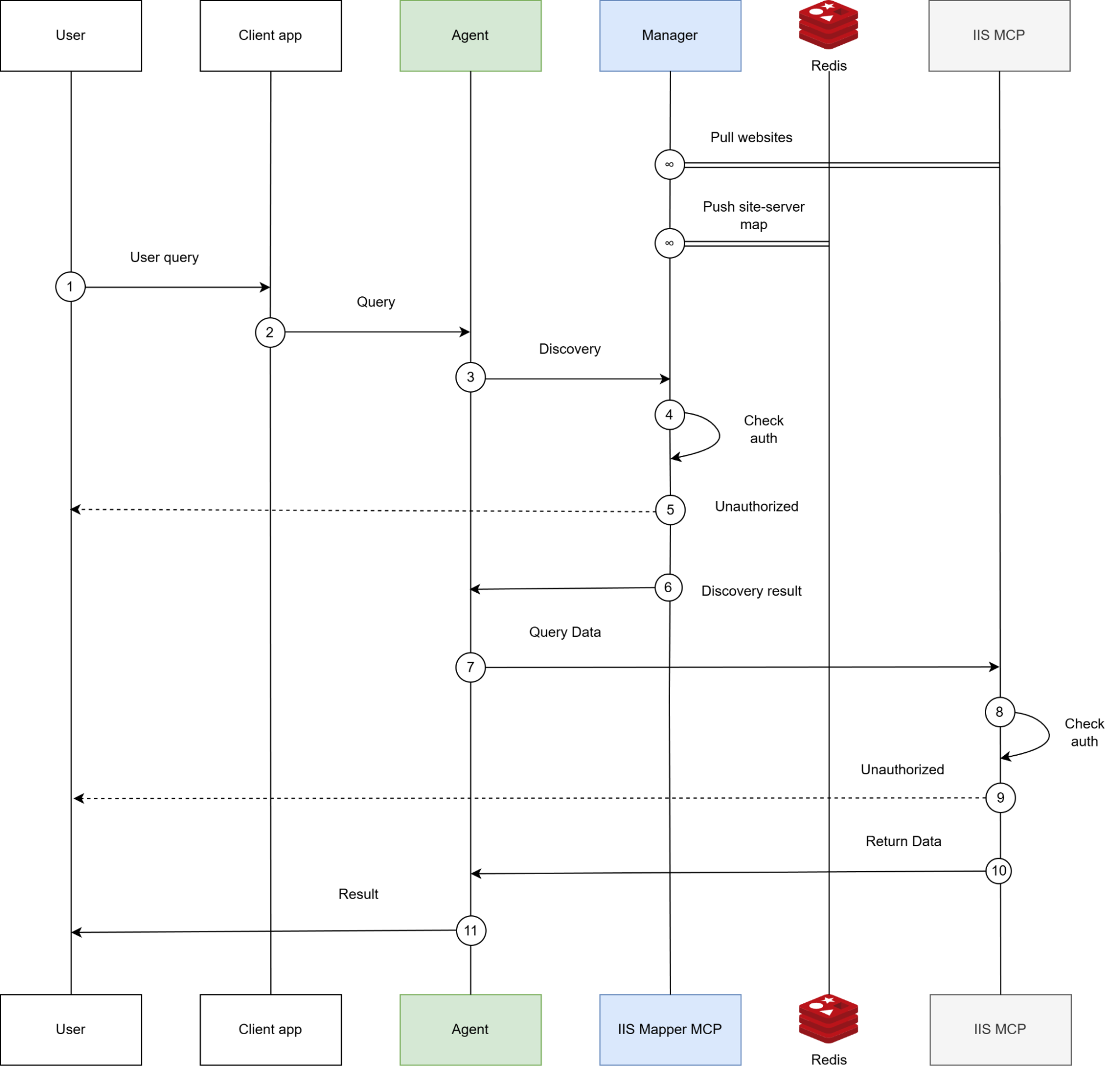
Resource Discovery

  1. User request: "Show me information about the production-api site"

  2. Discovery: The AI agent queries the Manager to find which server hosts the site

  3. Redis lookup: The Manager searches for the mapping in Redis

  4. Response: The Manager returns server information

  5. Direct request: The agent connects to the corresponding IIS MCP Server

  6. Execution: The server executes the operation

  7. Result: Information is returned to the user

Synchronization

The Manager continuously synchronizes data:

  1. Periodically polls each registered IIS MCP Server

  2. Gets lists of sites and application pools

  3. Updates mappings in Redis

  4. Maintains registry currency

Security

  • Authentication: All requests require authentication 

  • Local execution: Actions run only locally on the server

  • Logging: All operations are logged for audit

Error Handling

The system handles various scenarios:

  • Site not found

  • Server unavailable

  • Execution errors

  • Redis connection problems

All errors are returned in a structured format, allowing the AI agent to understand the problem and suggest a solution.

Advantages of the Approach

1. Working from existing client

Developers don't leave their familiar development environment. All operations are performed through the AI assistant.

2. Natural Language

No need to remember exact site names or command syntax. You can say "stop that production site" or "show me all sites that are currently running," and the AI will find the needed information itself.

3. Handling Inaccuracies

The AI covers any inaccuracies in communication:

  • If a site name is specified inaccurately, the AI can find similar options

  • If a server isn't specified, the AI will first find it through the Manager

  • If a request is ambiguous, the AI will ask clarifying questions

4. Security

  • No need for direct server access

  • No remote script execution required

  • All operations are authenticated and logged

  • The AI follows agent instructions that limit dangerous operations

5. Scalability

The architecture scales easily:

  • Adding a new server is simply registering it in the Manager

  • A centralized registry simplifies resource discovery

  • Each server is independent and can operate autonomously

Multi-Agent Architecture

One of the key advantages of our solution is the use of multi-agent architecture based on cagent. This allows creating specialized agents with clearly defined roles and instructions, significantly improving system reliability and predictability.

Docker cagent

Docker cagent is a runtime for orchestrating AI agents from Docker that allows creating and running teams of specialized virtual experts working together to solve complex problems.

Key Capabilities

In our solution, we used multi-agent architecture to separate responsibilities between specialized agents:

  • the coordinator processes user requests and delegates tasks
  • the discovery agent searches for resources by partial names
  • the action agent executes operations.

This separation made the system's behavior more predictable and reliable.

Critically important for integration with IIS MCP Server and Manager was support for the MCP protocol, which allows agents to connect to multiple MCP servers simultaneously. The discovery agent gets access to both the Manager for finding sites and all IIS MCP servers for getting detailed information, while the action agent can directly execute operations on the needed servers.

Agent configuration is described in a YAML file, simplifying setup and maintenance. Built-in "think" and "todo" tools help the coordinator plan complex multi-step operations, such as searching for a resource across multiple servers followed by performing an action.

For working with IIS, we use OpenAI models, but the ability to switch between providers allows adapting the system to various performance and cost requirements. Isolating each agent ensures that failures in one agent don't affect others.

One of the main advantages of cagent is its simplicity. In most cases, you don't need to write a single line of code — just describe the agent in a YAML file:

```yaml

#!/usr/bin/env cagent run

models:

  default:

    provider: openai

    model: gpt-5-nano


agents:

  root:

    model: default

    description: IIS Management Coordinator

    instruction: |

      ...

      instructions

      ...

    sub_agents:

      - discovery

      - action

    toolsets:

      - type: todo

      - type: think

      - type: mcp

        remote:

          url: https://iis-mcp-manager.domain.tld/mcp

          transport_type: streamable-http


  discovery:

    model: default

    description: Resource Discovery Specialist

    instruction: |

      ...

      instructions

      ...

    toolsets:

      - type: mcp

        remote:

          url: https://iis-mcp-manager.domain.tld/mcp

          transport_type: streamable-http

      - type: mcp

        remote:

          url: https://iismcp1.domain.tld/mcp

          transport_type: streamable-http

      - type: mcp

        remote:

          url: https://iismcp2.domain.tld/mcp

          transport_type: streamable-http

      - type: memory

        path: ./discovery_memory.db


  action:

    model: default

    description: IIS Action Executor

    instruction: |

      ...

      instructions

      ...

    toolsets:

      - type: mcp

        remote:

          url: https://iis-mcp-manager.domain.tld/mcp

          transport_type: streamable-http

      - type: mcp

        remote:

          url: https://iismcp1.domain.tld/mcp

          transport_type: streamable-http

      - type: mcp

        remote:

          url: https://iismcp2.domain.tld/mcp

          transport_type: streamable-http


```

MCP Integration

cagent natively supports the MCP protocol, allowing agents to use tools from any MCP servers. This is important for our solution, as IIS MCP Server and IIS MCP Manager provide their capabilities precisely through MCP.

Agents can connect to multiple MCP servers simultaneously, allowing the discovery agent to have access to both the Manager and all IIS MCP servers for resource discovery, while the action agent can directly execute operations on the needed servers.

Multi-Agent Architecture

Instead of a single universal agent, we use a system of three specialized agents:

1. Root Agent (Coordinator)

The main agent that coordinates the entire system's work. Its tasks:

  • Understanding user requests

  • Determining the operation type (status query or action)

  • Forming tasks for sub-agents

  • Delegating tasks to specialized agents

  • Aggregating results and presenting them to the user

The root agent has access only to the Manager via MCP, allowing it to find resources but not execute operations directly. This ensures clear separation of responsibilities.

2. Discovery Agent (Discovery Specialist)

An agent specializing in finding resources by partial names or keywords. Its features:

  • Instant reaction: When receiving a task from the coordinator, immediately calls the appropriate tool without thinking

  • Smart search: Distinguishes exact names (e.g., "acme.domain.tld") and partial matches

  • Multiple result handling: If multiple matches are found, returns all options for user clarification

  • Access to multiple servers: Has access to the Manager and all IIS MCP servers for resource discovery

The discovery agent's instructions clearly define its behavior:

```yaml

discovery:

  instruction: |

    When coordinator delegates a task to you or asks you to find

    a resource, you must immediately call the appropriate tool.

    Do not wait, do not ask questions, do not think about it -

    just call the tool.

```

3. Action Agent (Action Executor)

An agent that executes operations on found resources. Its characteristics:

  • Receives ready information: The coordinator passes it exact resource names and server addresses

  • Result verification: After executing an action, verifies its success through a status query

  • Specialization: Doesn't handle discovery — only executes operations

  • Security: Follows strict instructions and doesn't execute operations without complete information

Agent Instructions: The Key to Reliability

Detailed instructions for each agent are not just descriptions, but actually behavioral programs. They define:

  • Action sequence: Clear algorithm for each request type

  • Error handling: How to respond to failures, timeouts, server unavailability

  • Tool routing: Which tools to use for which tasks

  • Interaction rules: How agents communicate with each other

For example, instructions for the root agent define two main workflows:

Workflow for status queries:

  1. If the site name is partial — delegate to discovery agent

  2. Get exact names and server information

  3. For each site, query its status and its application pool status

  4. Present results to the user

Workflow for actions:

  1. Determine action type (direct action on app pool, site, or action on site's app pool)

  2. Delegate to discovery agent to find resources

  3. If multiple options found — ask the user

  4. Delegate to action agent with complete information

  5. Get result and present to user

Such detailed instructions allow the AI to clearly follow a predefined algorithm, minimizing errors and unpredictable behavior.

Advantages of Multi-Agent Architecture

  1. Separation of responsibilities: Each agent does what it does best

  2. Parallelism: Discovery and action agents can work in parallel for different resources

  3. Scalability: Can add more discovery or action agents as load increases

  4. Fault tolerance: If one agent is unavailable, others can continue working

  5. Testability: Each agent can be tested independently

Transitioning to Google ADK: Development Prospects

Google Agent Development Kit (ADK) is a framework that could become the next step in the evolution of this solution.

ADK offers more advanced planning mechanisms that could significantly simplify working with distributed infrastructure. Instead of a static action plan, the agent can automatically break down complex tasks into subtasks, adapt the plan when conditions change (for example, when one of the servers becomes unavailable), and execute independent operations in parallel. This is especially valuable when working with dozens of servers, when you need to simultaneously check the status of many sites or perform bulk operations.

Tool handling in ADK also reaches a new level. The framework can automatically discover available MCP servers and their tools, simplifying the addition of new IIS servers to the system. Smart caching and request batching will optimize interaction with infrastructure, reducing network load and speeding up operation execution. Moreover, ADK provides advanced error handling strategies with automatic retry and fallback mechanisms, improving system reliability under unstable network conditions or temporary server unavailability.

From an operational perspective, ADK offers powerful monitoring and debugging tools. Plan visualization allows understanding what the agent is doing at any given moment, while detailed tracing of all actions helps quickly find problems. Built-in performance metrics provide insight into how long various operations take, which servers respond faster, and where bottlenecks occur.

For corporate environments, the security and control capabilities that ADK provides out of the box are critically important. Declarative security policies allow clearly defining which operations the agent can perform and which it cannot, without needing to write these restrictions in each agent's instructions. Built-in audit mechanisms record all agent actions, which is necessary for security and compliance requirements. Granular access control to tools allows, for example, permitting an agent to read site information but prohibiting deletion, or limiting access to certain servers.

Conclusion

The combination of MCP and Agentic AI opens new possibilities for managing legacy infrastructure. We get an intuitive natural language interface that works directly from the developer's IDE, while maintaining all the advantages of security and control.

This approach allows:

  • Reducing operational complexity

  • Accelerating routine task execution

  • Improving developer experience

  • Maintaining security and control

Legacy infrastructure should no longer be an obstacle to modern development. With the right tools, it can be as manageable  as modern cloud solutions. Sometimes even more than brand-new.

When your infrastructure starts to feel limiting or you’re planning a major IT update, having the right expertise on your side can really help. You can reach out to UKAD to talk things through, or keep exploring the topic by reading our related articles.

Bogdan Kosarevskyi
Bogdan Kosarevskyi
DevOps at UKAD

Bogdan is a top-notch DevOps expert at UKAD, dedicated to optimizing infrastructure and streamlining development processes for the team and clients. Constantly evolving, he stays ahead of industry trends and shares his expertise through webinars, technical articles in international magazines, and knowledge-sharing initiatives. With a passion for automation and efficiency, Bogdan helps UKAD’s clients achieve scalable, reliable, and high-performing solutions.

Share article

Rate this article!

Your opinion matters to us