
Ecommerce ERP integration connects an online store with an enterprise resource planning (ERP) system so orders, stock levels, prices and customer details can move between them. The ERP often manages inventory, fulfilment and finance, while the ecommerce platform handles product browsing and checkout. Clear rules for which system owns each record and when updates run help reduce manual entry, overselling and inconsistent order data.
Ecommerce ERP integration: how to keep orders, stock and prices in sync
 26 November 2026
 7 minutes read

When to integrate an ecommerce platform with an ERP
Integration becomes useful when teams re-enter orders manually, storefront stock often differs from available inventory, orders are oversold, or finance reconciles sales by hand. Connecting the store and ERP can reduce duplicate entry and keep order, inventory and finance data aligned, provided each data type has a clear owner and sync rule.
Which data should flow between an ERP and an ecommerce platform?
The data flow depends on how the business operates. For each type of information, agree which system owns the record, which other systems need it, and what should happen if values conflict. A typical setup may look like this:
Data | Common source of truth | Typical flow | Business purpose |
|---|---|---|---|
Product details and media | PIM or ERP (product data); DAM (media assets) | PIM/ERP → ecommerce platform; DAM → ecommerce platform | Keep product information and media consistent across storefronts. |
Prices and promotions | ERP or pricing platform | ERP/pricing platform → ecommerce platform | Show current prices, currencies and customer-specific terms. |
Stock and availability | ERP or warehouse management system (WMS) | ERP/WMS → ecommerce platform; orders and reservations flow back | Keep availability current and reduce the risk of overselling. |
Orders and order changes | Ecommerce platform | Ecommerce platform → ERP | Send purchases to the systems used for fulfilment, invoicing and reporting. |
Customer and account details | CRM, ERP or ecommerce platform | Usually ecommerce → CRM/ERP; approved changes may flow back | Give teams consistent customer records for order processing and service. |
Fulfilment, delivery and returns | ERP, WMS or carrier system | Status updates flow back to the ecommerce platform; return details may flow to ERP | Show customers current order status and keep stock and finance records aligned. |
Payments, refunds and tax details | Payment service, ecommerce platform or ERP | Payment and refund status flow to ERP; order tax details flow to finance systems | Reconcile settlements and refunds, and keep VAT and transaction records aligned. |
Ownership can vary by field: a PIM may own product descriptions, a WMS stock movements and an ERP prices or finance records. Record these decisions and define what happens when systems disagree.
How ERP and ecommerce integration works
A typical order moves through five steps, from checkout to fulfilment and delivery updates:
Place order - The store captures items, delivery and payment status.
Validate and map - The integration checks IDs and required fields.
Create sales order - The ERP or OMS accepts the order and reserves stock.
Fulfil order - The warehouse picks, packs and dispatches it.
Return updates - Status and tracking information return to the store.
APIs and webhooks can transfer or trigger updates between these steps. A message queue can hold records for retry if a receiving system is temporarily unavailable.
An example .NET and Azure integration pattern
A custom integration might use ASP.NET Core for API endpoints, Azure Service Bus to handle asynchronous messages, and Azure Functions or background workers for scheduled processing. Azure Monitor and Application Insights can help track failures, while Azure Key Vault can store credentials. The right components depend on the systems, security requirements and operational needs.
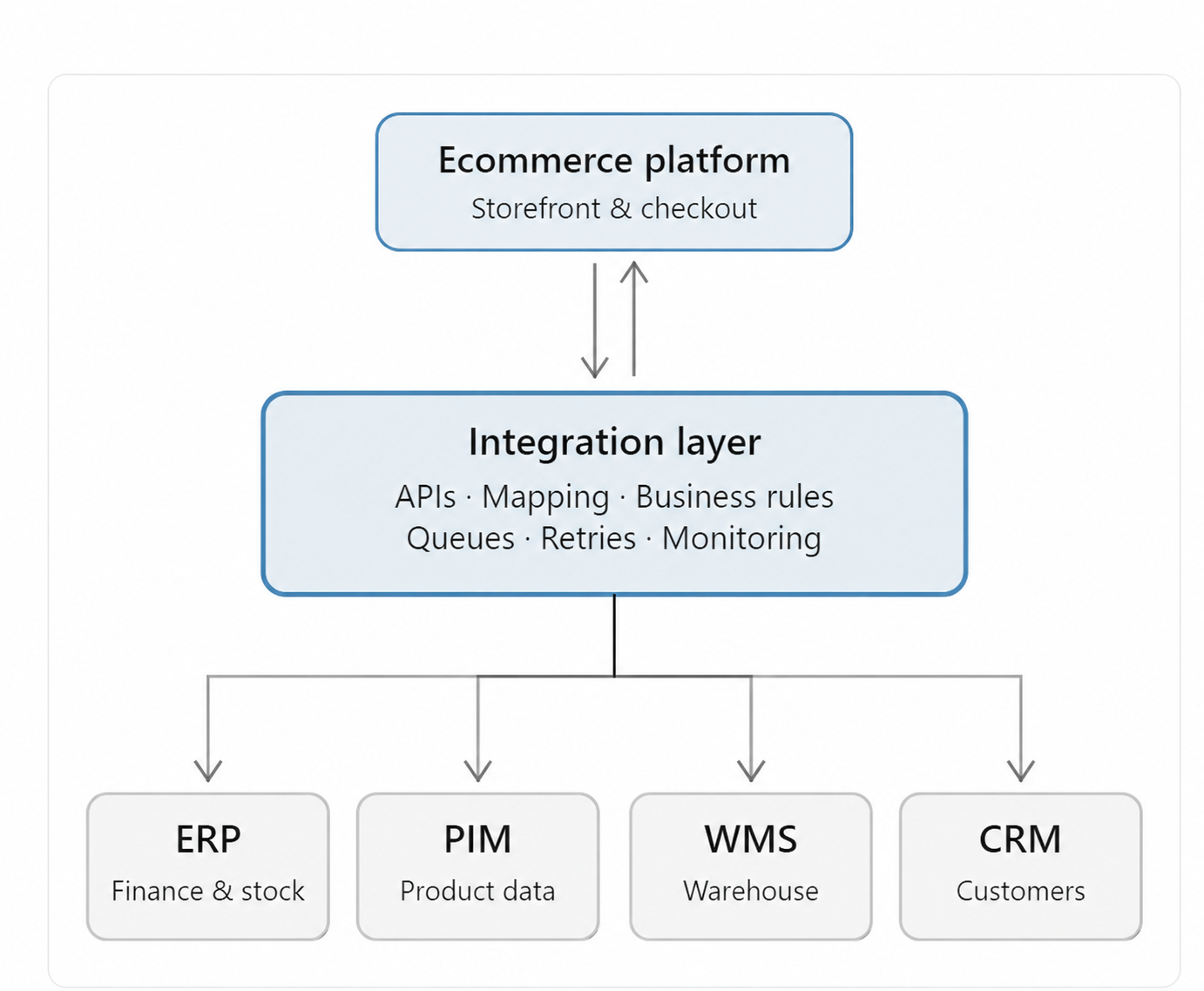
Illustrative architecture. Actual data ownership and integration directions depend on the implementation.
Choosing an integration model
The right setup depends on the number of systems, the complexity of their data flows, the available connectors and who will maintain the connection. A direct link may be enough for two systems, while broader workflows may need a shared integration layer. The AJ Produkter project illustrates a multi-market ecommerce ecosystem spanning 19 European markets and involving Optimizely, .NET and PIM.
Some businesses also place an OMS between the storefront and ERP to coordinate orders across channels. The ERP, PIM and WMS typically manage finance and inventory, product content, and warehouse operations, respectively.
Model | When it fits | Trade-off |
|---|---|---|
Point-to-point connection | Two systems have compatible APIs and only a few straightforward data flows. | It is simple to start with, but each additional connection adds another dependency to maintain. |
iPaaS platform | Existing connectors and workflow rules cover data exchange across several cloud applications. | It reduces custom development, but subscription costs, platform limits and connector coverage need consideration. |
Custom integration layer | Existing connectors cannot support the required interfaces or business rules. | It allows tailored data handling, but requires more development and ongoing maintenance. |
When standard connectors cannot support a workflow, custom API development provides the required endpoints and data-handling logic. Businesses can also combine approaches: an iPaaS platform might handle standard updates while a custom service covers a business-specific process.
Real-time vs scheduled ERP and ecommerce sync
The right sync frequency depends on the operational impact of a delay. A checkout response, an order event and a catalogue refresh rarely need the same cadence.
Immediate API requests
During checkout, the ecommerce platform may request current stock or pricing from the ERP and wait for a response. This gives a current check at purchase, but makes checkout depend on the ERP’s availability and response time. Checking the ERP on every product-page view can add latency and request volume. A common pattern is to show cached availability with a safety buffer, then confirm stock during checkout before accepting the order. A stock check does not reserve inventory. If multiple customers check out at the same time, the system needs to reserve or decrement stock when an order is accepted, then release the reservation if the order fails or is cancelled.
UKAD’s work with Dæk Drop In involves ecommerce availability based on distributor data and connections with fitting centres.
Suitable for: Confirming stock or price before an order is placed.
Event-triggered processing
An event, such as an order being paid or dispatched, starts processing in another system. This is often asynchronous and near real time, though the receiving system may not process it immediately.
Suitable for: Order confirmation, stock reservations, fulfilment and delivery status.
Scheduled batches
Systems transfer groups of records at set intervals, so information may remain unchanged between runs.
Suitable for: Product catalogue changes, finance exports, reporting and other processes where a delay is acceptable.
A hybrid setup might pair an immediate stock check at checkout with event-based order and dispatch messages, then run a scheduled reconciliation to find missed changes.
Common ERP and ecommerce sync errors and how to prevent them
Most sync errors come from unclear data ownership, mismatched records or failed message processing. Identifying the cause helps the team choose the right control.
Out-of-date stock. When stock changes in the ERP or warehouse system before the storefront reflects the change, displayed availability becomes inaccurate and overselling risk rises. Define which system owns stock, when an order reserves it, and how often quantities are reconciled.
Duplicate or missing orders. A timeout may trigger a retry even if the first request succeeded. Use a stable order ID and process repeat messages so they do not create duplicate sales orders.
Incorrect field mapping. Differences in SKUs, units, currencies or tax rules lead to inaccurate orders and product listings. Document how fields correspond between systems, validate required values and test unusual cases before launch.
Conflicting record changes. When teams edit product, price or customer data in multiple systems, one value can replace another. Assign an authoritative source and a conflict rule to each record type.
API failures and rate limits. Temporary outages and request limits interrupt data transfer. Distinguish temporary failures from invalid requests, set bounded retries, follow the provider’s retry guidance and alert the responsible team when processing stops. After retries are exhausted, route the message to a dead-letter queue for investigation and controlled replay.
Delayed or out-of-order events. Some event providers do not guarantee delivery order, so a later-arriving status can overwrite a newer one. Use sequence numbers or versions to identify stale events; if these are unavailable, retrieve the current record before applying a status change.
Before launch, assign responsibility for monitoring failures, resolving exceptions and reconciling records.
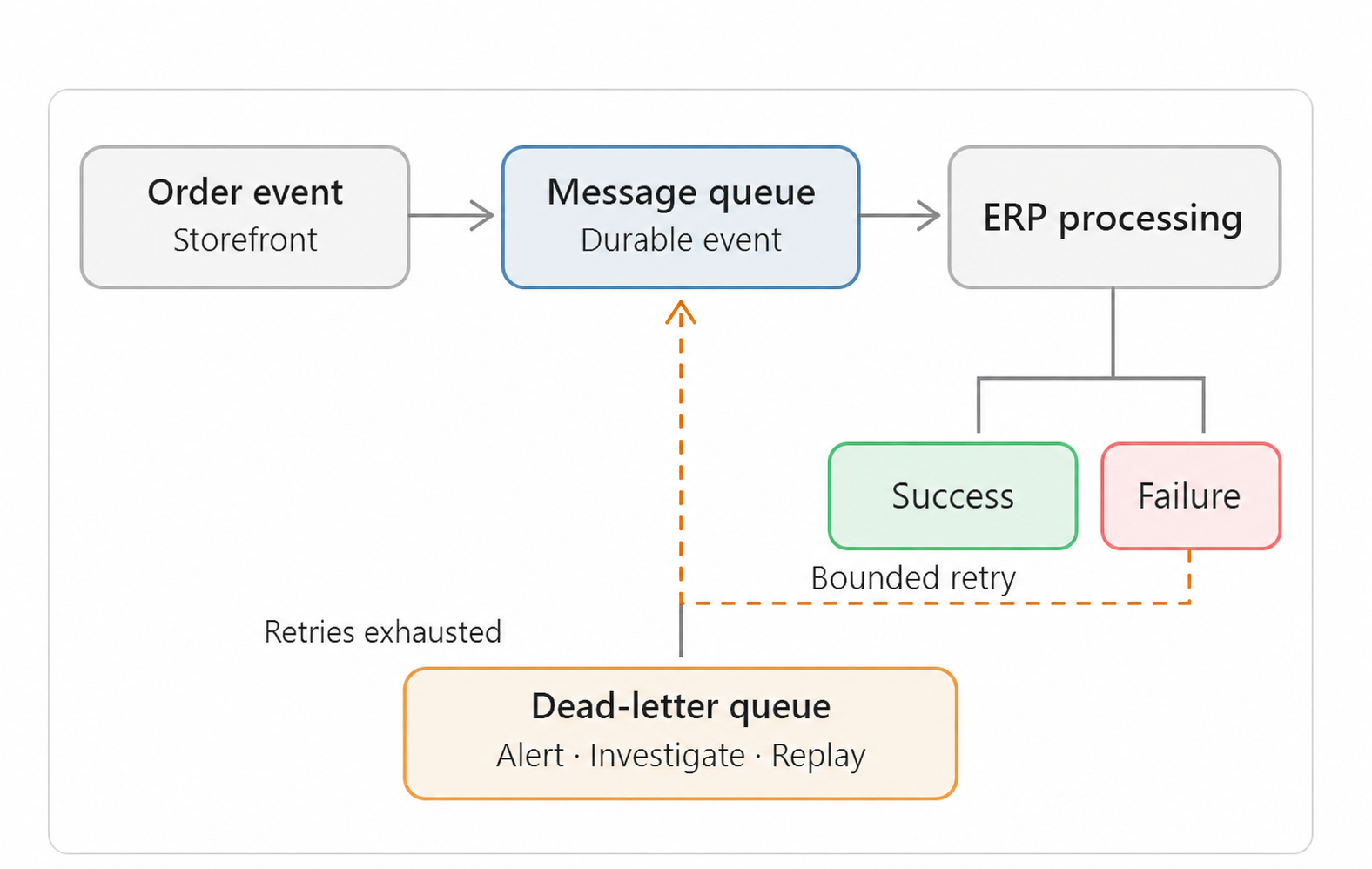
Illustrative failure-handling flow. Retry policies and queue behaviour depend on the systems and business requirements.
Integration security
ERP integrations can handle customer details, orders and commercially sensitive pricing, so security needs to be considered throughout the integration lifecycle. Use supported authentication, least-privilege access, encryption, secure credential storage and audit logging. UKAD’s ISO 27001 certification supports its security-focused delivery practices.
What affects ERP and ecommerce integration cost and timeline?
The cost and timeline depend on the number of data flows, the rules they follow and the quality of each system’s interfaces. Connecting two well-documented platforms for a single order flow is usually a smaller scope than synchronising orders, stock and product data across an ERP, ecommerce platform, PIM and warehouse system.
The following figures are indicative planning ranges, not a quote. Actual costs and timelines depend on the agreed scope. A straightforward connection may cost US$3,000–8,000 and take 2–4 weeks. Several data flows or custom business rules may cost US$10,000–25,000 and take 4–8 weeks. Work involving multiple systems, legacy software or complex data processing may cost US$30,000–60,000 or more and take 8–16 weeks or longer.
Key factors include:
Systems and interfaces. Each platform has its own API, authentication method, data structure and testing requirements. Adding a PIM or warehouse system may require extra mapping and validation.
Data flows and business rules. A one-way integration sends records in one direction. Two-way sync also accepts updates in return, which adds conflict-resolution and testing work. B2B workflows may involve customer-specific price lists, credit limits and order approvals, with pricing either synchronised as a price list or calculated at checkout according to contract terms, volume discounts and other rules.
Data volume and sync frequency. Near-real-time processing, high transaction volumes and API rate limits affect implementation and testing.
Existing data quality. Missing SKUs, duplicate records or inconsistent formats require additional mapping and preparation.
Testing and rollout. End-to-end testing, historical data transfer and a phased launch add work to the schedule.
The estimate should separate implementation from ongoing expenses such as iPaaS licences, hosting, API usage where applicable, monitoring and support. A clear scope, data-flow map and access to test environments help the team estimate both.
Best practices for ERP and ecommerce integration
Use this short checklist to prepare the scope, testing and support plan.
Map the systems and owners. List the connected platforms, versions, interfaces and test environments, then assign an owner for each record type.
Define flows and rules. Map fields, one-way or two-way updates, sync timing, tax handling and any B2B pricing or approval logic.
Make retries safe. Use stable IDs and idempotent processing so repeated messages do not create duplicate orders.
Plan stock checks. Confirm availability at checkout and set a clear policy for refreshing cached stock.
Monitor and reconcile. Track failures and delays, alert the responsible team, and compare records across systems.
Test and stage rollout. Check missing data, duplicate messages, outages and out-of-order events. Launch in stages and document rollback steps.
Which ERP and ecommerce platforms can be integrated?
Ecommerce integration with ERP can use an API, webhooks, scheduled file exchange or a supported connector. The practical question is how much of the required data flow those options cover and whether any part needs custom development.
System type | Examples | What to check |
|---|---|---|
ERP | Microsoft Dynamics 365 Business Central, SAP, Oracle NetSuite, Odoo, Sage | API coverage for the required records, authentication, rate limits and cloud or on-premises setup |
Ecommerce platform | Shopify, BigCommerce, Adobe Commerce, WooCommerce | Order and inventory API coverage, webhook support and limits on extensions or custom logic |
Ecommerce built on a CMS or commerce framework | How the platform structures products, prices and orders, and where custom logic may be needed | |
Headless or API-first commerce | Where business logic sits and which integration capabilities are available | |
PIM | Struct PIM, Salsify | How product data is managed, validated and made available to the store |
Warehouse management system (WMS) | Manhattan Associates, Blue Yonder, Körber and other warehouse management systems | How stock, picking, packing and warehouse movements are exposed to connected systems |
Older or on-premises ERP systems may not offer a modern API. Integration may rely on vendor-supported interfaces, intermediary services or file exchange. Direct database access should be assessed carefully because it can introduce security, data-integrity and upgrade risks.
These examples cover common platform categories rather than every possible pairing. Some of the platforms listed are technologies UKAD works with. Connector coverage and API capabilities vary by version and edition, so confirm them against vendor documentation for the systems in scope.
How UKAD supports ecommerce ERP integration
UKAD can help connect a new ecommerce platform to an ERP, modernise an existing integration, troubleshoot reliability issues or provide ongoing engineering support. Our teams can lead delivery or work alongside your in-house team, ecommerce agency or ERP partner.
ERP and ecommerce integration FAQs
Questions about ecommerce ERP integration, platform roles and sync timing.
-
An ERP system supports core operations such as finance, purchasing, inventory and order processing. Integration connects those records with the online store so orders and updates do not need to be entered manually in both systems.
-
Shopify lists direct integrations for select ERP, accounting and PIM systems, iPaaS providers, and custom APIs as connection options. Its guide to external integrations for B2B explains that available data depends on the connector and covers B2B considerations such as company, catalog, customer and pricing data.
-
An ERP supports business operations and finance. An OMS coordinates orders across channels. A PIM manages product information, and a WMS supports warehouse processes and stock movements. A company may use some or all of these systems, so the integration design should assign ownership for each data type.
-
Usually not. Checking the ERP on every page view adds latency and API load. A storefront can show cached availability with a safety buffer, then confirm stock at checkout. See the sync timing section for details.
