How AI accelerates Umbraco development projects with MCP

calendar icon 24 June 2026
clock icon 5 minutes read
MCP in Umbraco projects.jpg
Share article

Introduction

Many organizations running Umbraco are looking for ways to improve delivery efficiency while preserving code quality, maintainability, and long-term scalability. As AI-assisted development becomes more common, new approaches are emerging to support routine engineering work.

One of them is Umbraco MCP (Model Context Protocol). Unlike a traditional AI chat, MCP gives AI assistants structured access to a project's content models, codebase, and configuration.

This article explores how Umbraco MCP works, where it fits into real-world Umbraco projects, and why human review remains an essential part of the process.

What is Umbraco MCP

Umbraco MCP gives AI assistants direct, structured access to content models, code, and the definitions that shape how information is organized within the platform. Instead of guessing how a website is built, AI tools can inspect document types, existing structures, and established development patterns to produce output that aligns with existing conventions.

This is the difference between generic AI in Umbraco development and AI that understands the environment it is working within. Access to real implementation details helps produce more relevant results and reduces the amount of manual correction required.

As a result, teams can focus more on technical requirements, integrations, and other business-specific needs. This can be particularly valuable in complex Umbraco solutions.

How to use Umbraco MCP

Supported AI Agents

Umbraco MCP can be used with a range of AI agents, including Codex, Claude, GitHub Copilot, Cursor, and others.

For more niche agents, such as PI Agent or OpenCode, additional configuration may be required. In these cases, it is worth consulting the agent's own documentation and setup guides.

Verifying MCP connectivity

After configuring MCP according to the official Umbraco documentation and installing Umbraco Agent Skills, restart the AI assistant. This step is typically required before the new capabilities become available.

A simple way to verify that MCP is working correctly is to use a prompt such as:

Use MCP and check the ID of the Home page.

The result can then be validated directly in the Umbraco backoffice.

Working with uSync

If a project uses uSync, it is recommended to explicitly instruct the agent to use MCP and avoid modifying uSync files. This instruction can be added to an AGENTS.md file or a similar configuration file used by an AI tool.

For example:

Always use MCP for Umbraco changes and do not modify uSync files.

Direct modifications to uSync files may consume fewer tokens. In practice, MCP-based changes tend to be more reliable, especially when creating new content structures.

Building on existing functionality

When implementing new features, providing a reference to a similar implementation usually produces better results.

For example:

Check the current structure of blog pages and add a new document type called "Specific Blog". The new blog pages should work similarly to the existing blog pages, but with...

The same principle applies when extending content structures, introducing new blocks, or adding editor functionality. Established patterns provide valuable context and improve the consistency of AI-generated output.

Common AI-generated issues

Even with direct access to project structures, AI-assisted changes should be reviewed before becoming part of the solution.

View templates

When creating new page types, AI agents sometimes create the corresponding .cshtml file but fail to create or assign the matching template in Umbraco. Manual template creation and assignment may still be required.

Invalid collection IDs

Under:

Structure → Presentation → Collection

the agent may occasionally assign an invalid ID.

This does not affect the underlying functionality. However, child items may appear empty when content editors view the document type in the backoffice.

Removing the invalid value typically resolves the issue.

Content structure validation

Generated configurations should be reviewed before implementation. Allowed child document types and content hierarchy rules occasionally require manual adjustment to match project requirements.

Where Umbraco MCP delivers the most value

The most useful Umbraco MCP use cases share a common pattern: there is already a clear structure in place, and the task is to extend it rather than invent it from scratch. MCP delivers the strongest results when AI can work with existing content models, established coding patterns, and documented project standards.

Much of this effectiveness comes from Umbraco Agent Skills, which provide AI assistants with predefined capabilities for common development tasks. Combined with MCP, they help AI work more consistently with existing structures and development patterns. This can reduce repetitive development work, accelerate prototyping, and help teams deliver standard functionality more efficiently.

The table below summarizes where it tends to provide the greatest value and where traditional engineering approaches remain essential:

Task type

Good fit for AI + MCP

Why

Test content

Yes

Structure already exists

Content extensions

Yes

Easy to validate

Boilerplate code

Yes

Follows existing patterns

New features from existing templates

Yes, with review

Existing examples provide context

Backoffice prototypes

Yes

Rapid implementation

New architecture from scratch

No

Requires architectural thinking

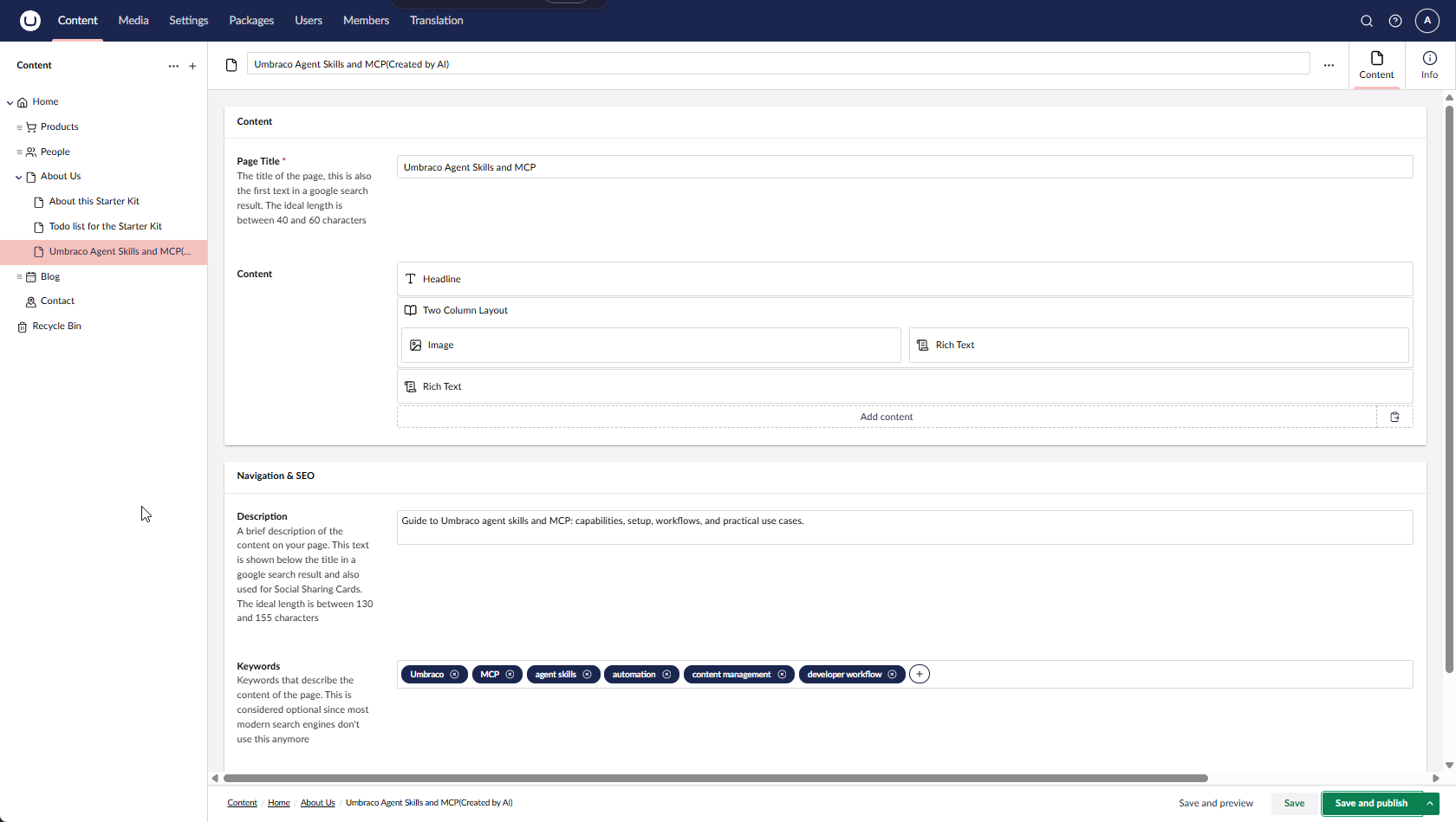
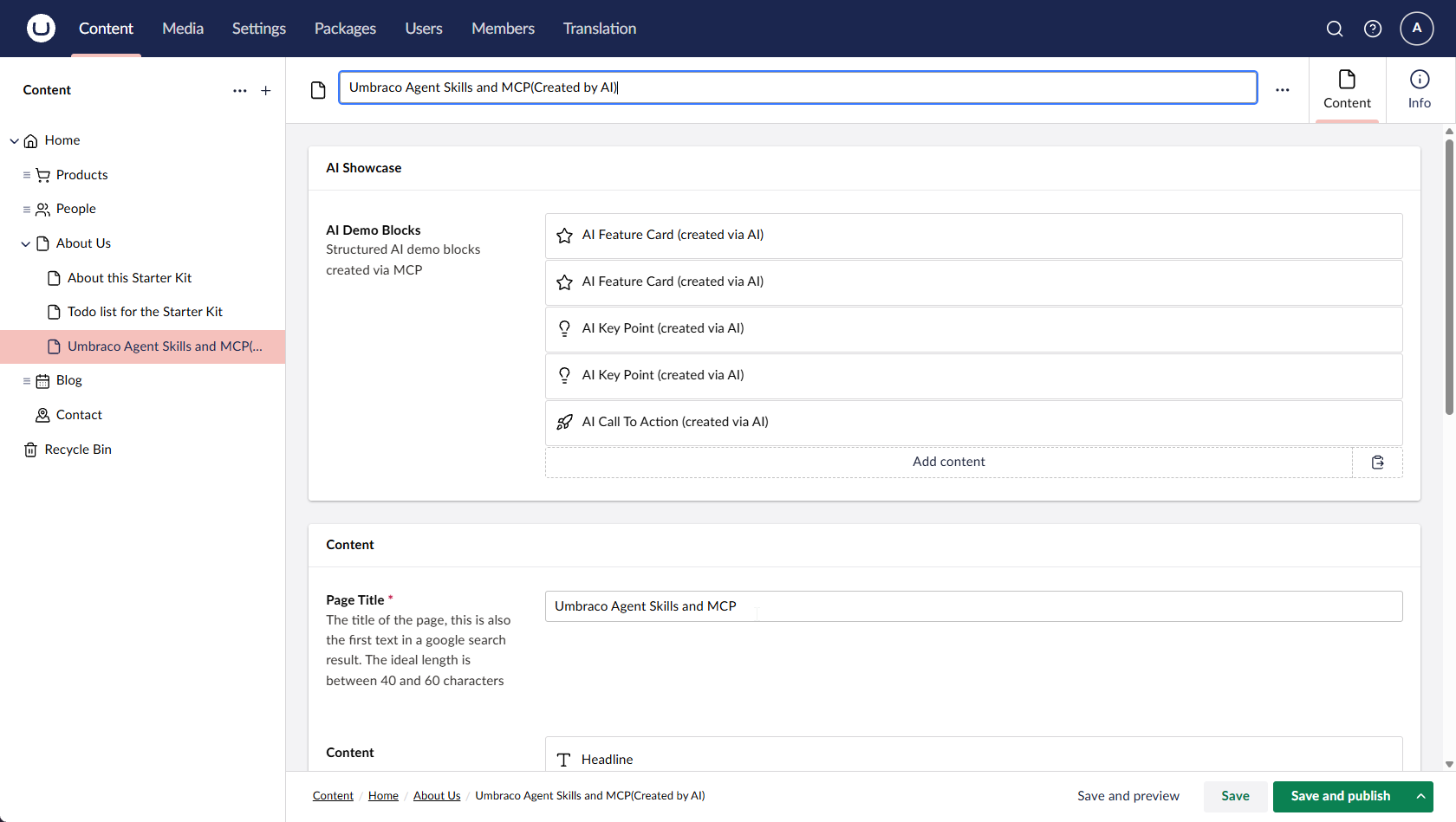
Creating test content faster

Generating test content is one of the most straightforward applications of Umbraco MCP. Instead of manually populating pages and components, AI can quickly create realistic content for testing, demonstrations, and editor reviews.

Typical examples include:

  • building sample landing pages;

  • testing block layouts;

  • creating content for QA;

  • preparing demonstration environments.

This can help teams validate page structures and editor experiences earlier in the delivery process while reducing the manual effort required to prepare test environments.

How AI accelerate Umbraco Development

How AI accelerate Umbraco Development

AI-generated test content created within an existing Umbraco content structure.

AI-generated test content created within an existing Umbraco content structure.

Extending existing content structures

As Umbraco projects evolve, the platform often needs to adapt to new business requirements. Marketing teams may need additional fields, editors may require new settings, and multilingual websites often need extra labels or translations.

Typical examples include:

  • adding new text fields;

  • creating labels;

  • managing translations;

  • introducing CMS-controlled settings.

These changes are usually small and well-defined, making them a good fit for AI-assisted development. Because the underlying structure already exists, MCP can help implement updates consistently across the platform.

This approach can be particularly relevant during platform modernization initiatives, where incremental improvements are introduced over time rather than through a complete rebuild.

How AI accelerate Umbraco Development (8).png

Generating boilerplate code with AI-assisted development

Standard project components follow established patterns within the codebase. In these scenarios, Umbraco MCP can help reduce repetitive development work and provide a structured starting point.

Typical examples include:

  • content blocks;

  • templates;

  • view models;

  • reusable UI components.

Rather than starting from scratch, AI can use similar components as a reference and generate code that aligns with existing project conventions. Developers can then review, refine, and extend the result based on the specific requirements of the task.

This approach works particularly well when similar functionality is already available within the project. Instead of beginning with an empty file, teams can build on an initial code structure and adapt it to the feature being developed.

Building new features based on existing patterns

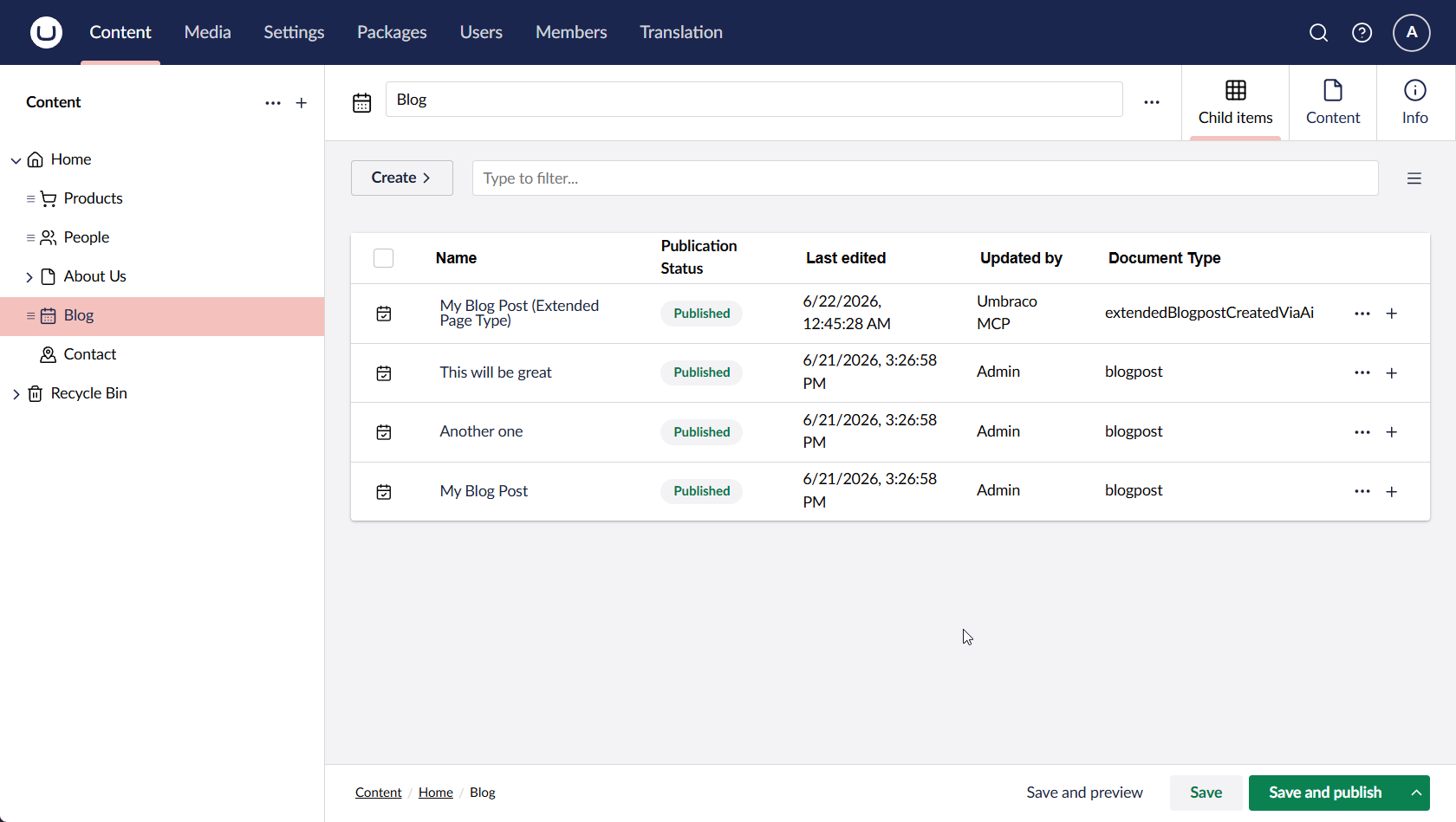
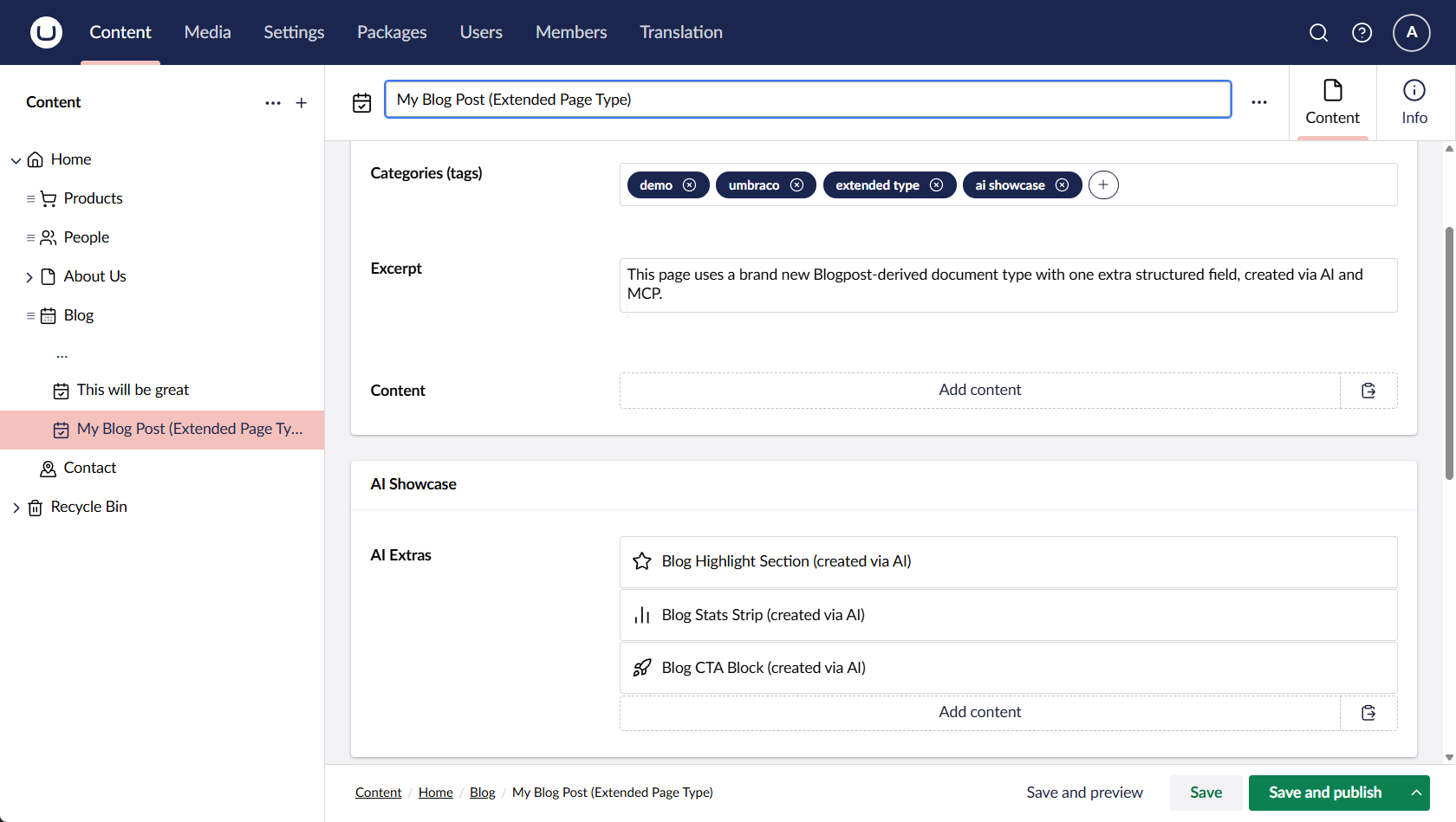
Some tasks go beyond creating individual components and involve expanding functionality that already exists within the platform. In these cases, MCP can use existing implementations as a reference and help teams build new features more efficiently.

A practical example is creating a new page type based on an existing template while introducing additional layouts, content sections, or business logic. Instead of starting from scratch, developers can build on proven approaches that are already used elsewhere in the solution.

This can be particularly useful when extending content-driven websites, customer portals, or internal platforms, where consistency across templates and editor experiences is important. By working from existing examples, teams can introduce new functionality while maintaining a familiar user experience.

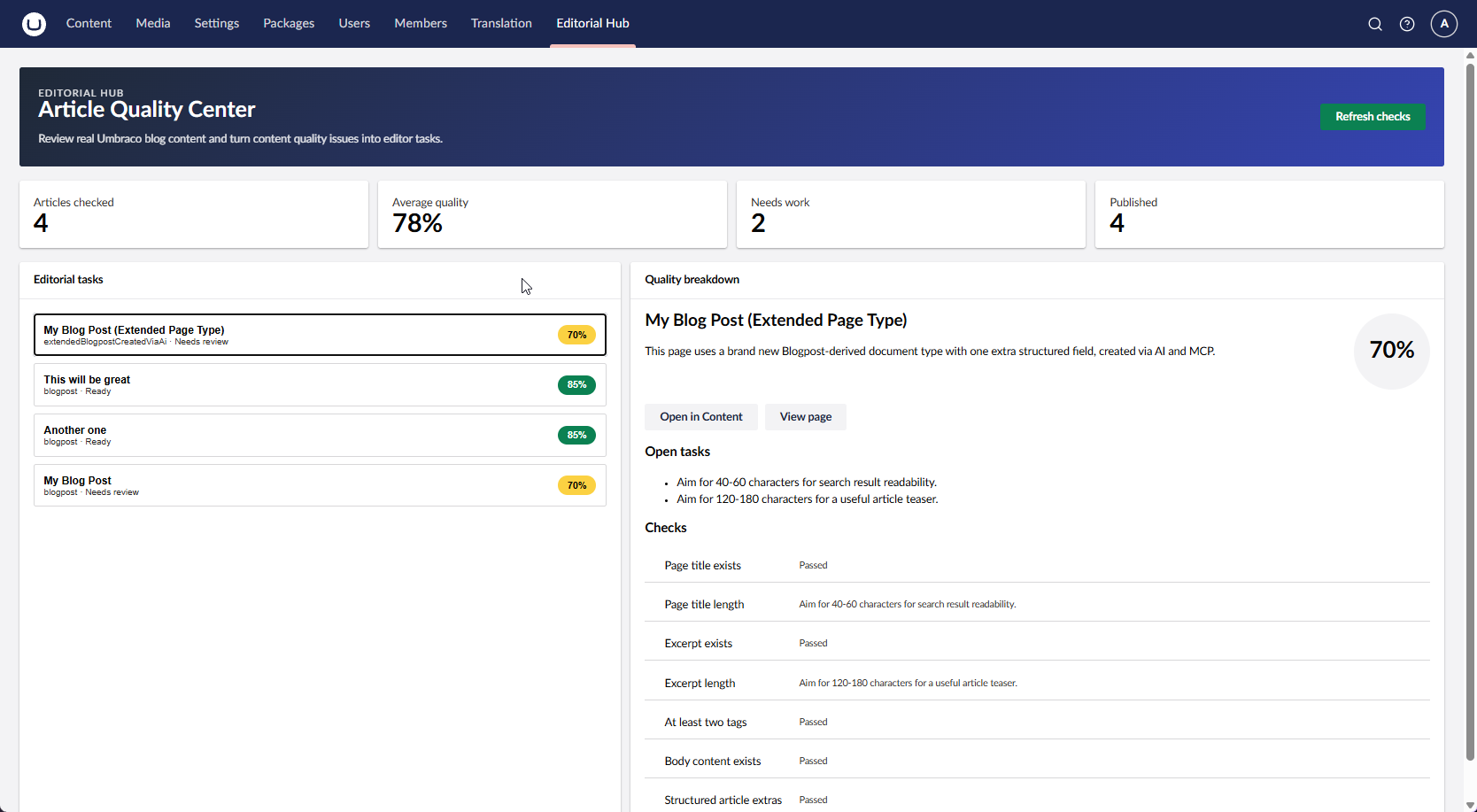
Creating a new page type by extending existing project functionality.

Creating a new page type by extending existing project functionality.

Creating a new page type by extending existing project functionality.

Creating a new page type by extending existing project functionality.

Rapid backoffice development in Umbraco 17

Umbraco 17 introduced new opportunities for building custom backoffice experiences. When existing project patterns are available, MCP can help teams create internal tools and editor-facing interfaces more efficiently.

Typical examples include:

  • sections;

  • views;

  • editor dashboards;

  • internal tools.

This is especially valuable during the prototyping stage. Instead of waiting for a complete implementation, teams can quickly create working concepts, gather feedback from editors and stakeholders, and refine the solution before investing additional development effort.

Prototype of a custom backoffice view in Umbraco 17.

Prototype of a custom backoffice view in Umbraco 17.

Real-world limitations of Umbraco MCP

While MCP significantly improves how AI interacts with Umbraco projects, it is not a universal solution. The effectiveness of the output depends heavily on the foundations already in place.

Projects with clear coding standards, consistent structures, and established development practices typically produce better results. When these foundations are missing, AI-generated output usually requires additional review and refinement. The same principle applies when introducing third-party agent skills. Teams should evaluate permissions, implementation details, and security implications in the same way they would assess any external dependency.

MCP can support routine implementation work, but teams still need technical judgment, engineering oversight, and domain expertise.

Where Umbraco MCP requires human oversight

While MCP can support a wide range of tasks, some areas require closer attention than others. The most common examples include coding standards, architecture, security, and long-term maintenance.

The table below highlights situations where AI-generated output typically benefits from additional validation.

Risk area

Potential issue

How teams address it

Coding standards

Generated code may not follow project conventions

Developer review

Architecture

Technical decisions may not align with long-term goals

Architect oversight

Security

Generated code may introduce vulnerabilities

Security reviews and testing

Maintainability

Quick solutions may not scale over time

Code review and refactoring

Following project coding standards

AI-generated code does not automatically follow project conventions. In some cases, it may produce technically correct solutions that differ from the patterns already established within the codebase.

For example, projects using Models Builder may receive generic implementations instead of strongly typed generated models. While functional, this approach can reduce consistency, make the code harder to maintain, and create unnecessary differences between similar components.

Over time, these inconsistencies can increase technical debt and make future enhancements more difficult. This is why generated code should always be reviewed against the project's existing standards and development practices.

Architecture decisions still require humans

AI can help implement features, but it does not understand the broader business context behind a solution.

During migration, upgrade, or modernization initiatives, teams often need to make decisions about integrations, content architecture, scalability, and future maintenance. These choices influence how the platform will evolve over the coming years and often involve trade-offs that go beyond the technical implementation itself.

Because of this, architectural direction should be defined by experienced engineers and solution architects who understand both business objectives and technical constraints. For organizations that need access to this expertise, working with experienced Umbraco developers can help ensure that technology decisions support long-term business goals rather than only immediate implementation needs.

Security and quality assurance remain critical

All AI-generated code should pass through the same engineering processes as manually written code.

This includes:

  • build validation;

  • testing;

  • peer review;

  • security checks.

AI can be highly effective for customization, test content generation, boilerplate code, and rapid prototyping. However, every change should still be validated through review, testing, and security checks before becoming part of a production solution.

The same principle applies in day-to-day project work. I'd treat Umbraco MCP as a tool for speeding up development, not a replacement for developer review. It's genuinely useful for customization, test content, boilerplate code, and fast prototyping - but every change still goes through build, review, and security checks, the same as any other code.

What this means for clients

MCP does not change development standards. It changes how certain tasks are completed.

Area

Traditional approach

AI-assisted with MCP

Test content

Manual creation

Faster generation

Structure updates

Repetitive implementation

Faster execution

Backoffice prototypes

Full development cycle

Earlier feedback

Standard components

Manual setup

Faster delivery

Typical outcomes include:

  • less time spent on routine tasks;

  • earlier prototyping and feedback;

  • more efficient delivery of standard functionality;

  • greater focus on complex technical requirements.

For product teams, digital agencies, and enterprise organizations, this can help reduce delays and make proposed changes visible earlier in the delivery process.

Final thoughts

Umbraco MCP works best when there is already a clear structure to build on. Existing models, development standards, and review processes provide the context needed for more consistent results.

It can support tasks such as generating test data, extending existing structures, creating standard components, and prototyping backoffice functionality. For organizations working with Umbraco, this can reduce manual effort and accelerate routine implementation work without changing established development processes.

Considering Umbraco MCP, an upgrade, or platform modernization?

Request a call →

FAQ

  • No. Umbraco MCP can help with routine development activities, but it does not replace architectural decisions, code review, or security checks. Every change generated with AI assistance still goes through the same engineering processes as code written by hand.

  • No. Umbraco MCP can help teams complete routine tasks more efficiently, but architecture planning, technical decision-making, code review, and security validation still require experienced specialists. 

  • Yes, particularly for implementation work. Upgrade, migration, and modernization initiatives often include smaller tasks such as rebuilding content structures, extending fields, and recreating components, where MCP can help reduce manual effort. Migration strategy, architecture decisions, and technical planning still require experienced engineers.

  • Not as effectively. MCP performs best when there is already a content model, codebase, or established pattern to reference. On a new Umbraco CMS implementation, the initial architecture and content structure typically need to be defined before AI-assisted development can be applied effectively.

  • Skills maintained by the Umbraco team are generally the most reliable choice because they are designed specifically for Umbraco workflows and development patterns. Third-party skills should be reviewed in the same way as any external dependency, including permissions, implementation details, and security considerations before being adopted within a project.

  • Umbraco MCP can help reduce the effort required for routine tasks such as test content generation, content structure updates, standard components, and backoffice prototypes. This allows development teams to spend less time on repetitive work and more time on activities that require engineering expertise.

    For businesses, the benefit is typically seen in delivery efficiency rather than reduced development standards. Code review, testing, and security validation remain unchanged and continue to be part of the development process.

Vadym-03.png
Vadym Dmytriiev
.NET Developer

UKAD's talented developer who is passionate about developing and implementing unique and creative solutions to meet business needs. Always eager to support and collaborate to advance the product and the company. Constantly learning new skills to become a well-rounded developer that employers can rely on. 

Share article

Rate this article!

Your opinion matters to us

Rating: 5.0/5